Photos and spoken site notes in.
A client-ready PDF out — before you leave the site.
Snap a few photos, mark up the problem, and say what you see — even with no signal. TradeWrite AI turns that raw trade jargon into a professional, branded PDF report for the client or insurer. No more 45 minutes at the kitchen table every night typing it up.
3 reports a month, free forever — no card needed. Or .
Just need a quote out the door right now? Use the free invoice & quote generator — no signup, GST sorted.
On the tools? The field app for your crew is a free download for iPhone and Android.


Or open tradewrite.aimdev.site/app on your phone.
How it works
1. Capture on site — even offline
Start from a trade checklist so nothing gets missed. For each item, take a few photos, mark them up — draw an arrow, circle or freehand right on the photo to point at the defect — then just say what you see: “guttering’s completely rusted through”. Dictation runs on the phone itself, so basements, roof spaces and rural dead zones don’t matter. Everything queues and syncs when you’re back in coverage.
2. AI writes the English
Your raw notes get rewritten into professional technical English a client or insurer expects — and if you dictated in another language, the report still comes out in English. You review it before anything goes out.
3. Branded PDF, done
A branded inspection report renders as a PDF in seconds, with your photos in place — ready to send to the client or insurer straight from your company dashboard.
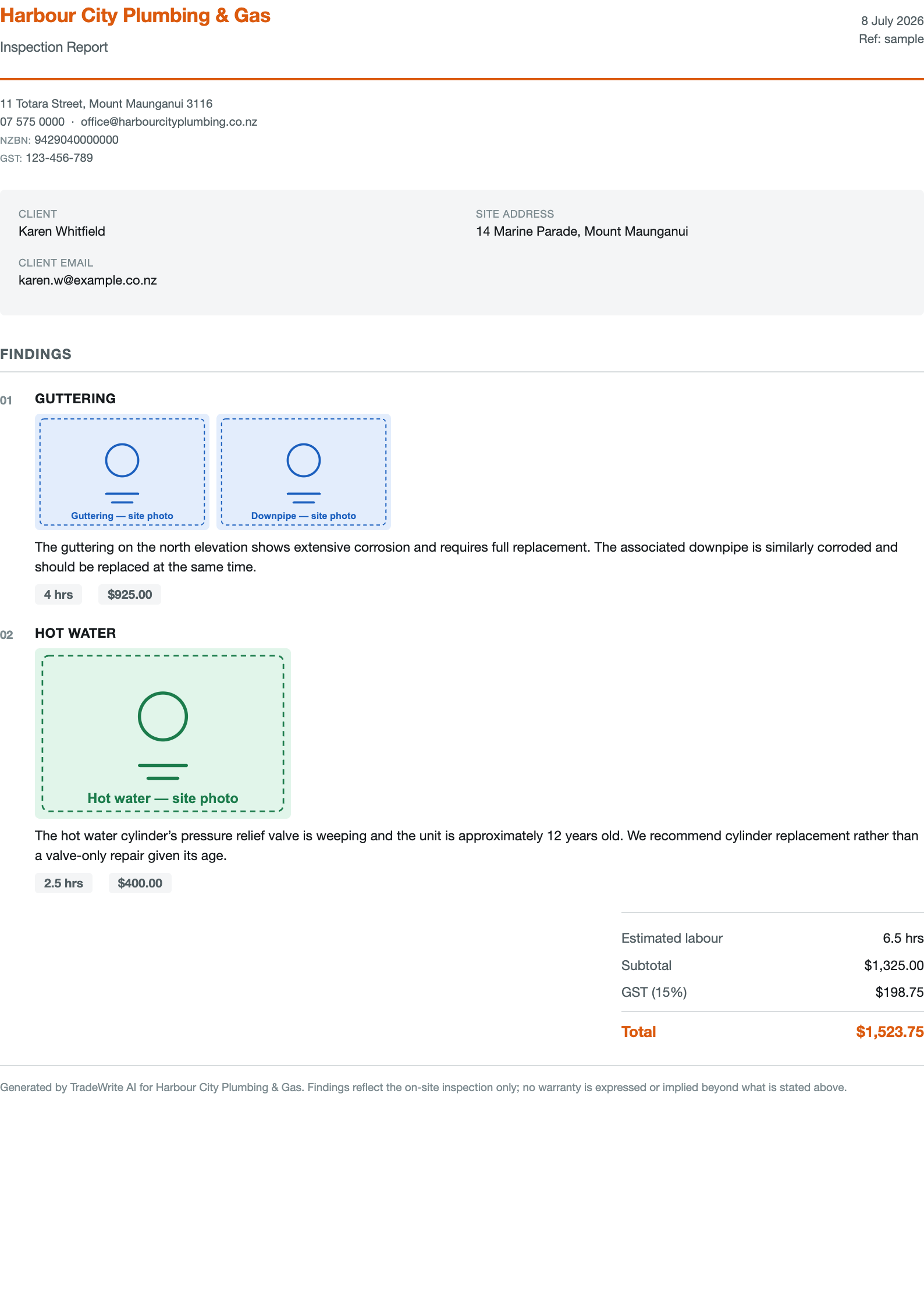
The actual output — open the full sample PDF. Your logo, your accent colour, your details on the letterhead.
Built for real job sites
Point at the problem
Take several photos of an item and mark them up on the spot — draw an arrow, circle or freehand straight on the photo so there’s no doubt what you’re flagging.
Trade checklists
Start a job from a trade checklist template so nothing gets missed — walk the list, capture as you go, done.
Works offline
Speech-to-text happens on your phone, not in the cloud. No signal on site changes nothing about how you work — it all syncs when you’re back in range.
Talk or type
Every item has a mic/keyboard toggle. Not keen on dictating, or the drill’s going? Type it — same result.
Any language in, English out
Dictate or type in the language you think in. The client-facing report comes out in professional English.
One login, every company
Pick up casual work for more than one outfit? A single login switches between every company you belong to — no separate accounts to juggle.
Run the whole team from one web portal
Every report in one feed
As reports come in from the field they land in a single company feed — open any one and download the branded PDF to send to the client or insurer.
Manage your team
Invite your workers by email and set each one as an admin or a worker. Admins run the portal; workers just capture on site.
Billing in one place
Pick or change your plan and manage billing from the portal, all under your AimDev ID — change or cancel any time.
What’s the evening write-up costing you?
No customer quotes yet — so here’s the proof instead
TradeWrite AI is new, and we’d rather show you the actual thing than invent a happy tradie. Check it yourself before you hand over an email address.
The real output
A genuine report straight out of the renderer — not a mockup. Same template your reports use, with your logo, colour and details on the letterhead.
The whole loop, no signup
Capture as a worker, then look at the same report in the owner’s feed. Simulated data, nothing saved, no account needed.
Nothing to lose
3 reports a month free, forever — no card, no trial clock. Your reports stay yours, and you can export and leave whenever you like.
Pricing
Try the full product: AI polish and PDF reports, 3 a month. Your own branding on the PDF comes with a paid plan.
For a sole trader or small outfit doing regular inspection work.
For a busy crew putting out reports most working days.
For multi-crew businesses with steady report volume.
Every plan — including Free — has unlimited team members and the full pipeline: AI rewrite and PDF reports. Custom branding on your PDFs and client portals — your logo and accent colour — is on Trade and up; Free reports carry your workspace name. The other difference is how many reports you can generate each calendar month (a report counts the first time an inspection’s PDF is generated — regenerating it later is free). You subscribe inside the TradeWrite app through the App Store or Google Play, and change or cancel any time from your store account.
Trade comes with a 14-day free trial. Annual plans for Trade and Crew (two months free) are available in the app.
Prices are in US dollars; the App Store and Google Play bill you in your local currency. New Zealand prices shown include GST. Australian prices are shown in the app. The app is free to install and the Free plan needs no subscription. Past your monthly limit your captures are still saved; more reports is what a bigger plan unlocks.
Want to see it first? Try the interactive demo — simulated data, nothing saved, no account needed.
Start on Free and upgrade only when 3 reports a month stops being enough. No card for the free tier · cancel anytime · your data stays yours.
Straight answers
Does dictation really work with no signal?
Yes — speech-to-text runs on the phone itself, not in the cloud. Basements, roof spaces and rural black spots change nothing about how you capture. Your items queue on the phone and sync when you’re back in coverage; the AI rewrite happens then.
Whose data is it, and where does the audio go?
Your workspace’s reports, photos and notes belong to your company. Voice audio never leaves the phone — only the transcribed text syncs. The full detail is in our privacy policy, written in plain language.
Which phones does the app run on?
iPhone and Android. It’s a free download from the App Store and Google Play, and it updates itself from then on. Everyone in your crew can use it; the workspace admin reviews and sends reports from the web dashboard on any phone or computer.
What exactly does my client receive?
A branded PDF report — your logo, your letterhead details, numbered findings with the site photos, and (if you priced the work) per-area charges with a GST total. See the sample PDF — that’s the real template with example data.
Is this a building or property inspection report app for New Zealand?
Yes. TradeWrite AI is made for NZ tradies and inspectors writing building and property inspection reports, site reports and job write-ups. Prices are set in US dollars and billed by the App Store or Google Play in your currency — in New Zealand that is from NZ$64.99 a month, GST included — the PDF carries your own branding on paid plans, and the trade checklist templates cover the items NZ clients expect to see.
How does voice to report work?
Walk the site, take photos and say what you see in your own words — trade jargon is fine. The phone transcribes on the spot, the AI rewrites the notes into clear, client-ready English, and the report comes out as a numbered, branded PDF in seconds. You read it over before it goes to the client.
Get the app
The field app is a free download on the App Store and Google Play — install it like any other app and it updates itself from then on.
The web dashboard (reports feed, team, billing) works on any phone or computer.
Setup is three taps on the phone: install it, sign in (or create an AimDev ID), and type your business name — that’s the name your clients see on reports. You’re capturing straight after. Nothing to set up on a computer first.
Working for someone else? Ask them to invite you by email instead — you’ll join their workspace rather than starting your own.
Or open tradewrite.aimdev.site/app on your phone.